Three steps, and only one of them is yours
The work is ours. Every decision is yours.
-
You export
You click the export buttons inside your current system: clients, appointments, services, and the gift vouchers still outstanding. If you would rather not do it alone, we will sit on a twenty-minute screen share while you click. You drive; we watch.
-
We import
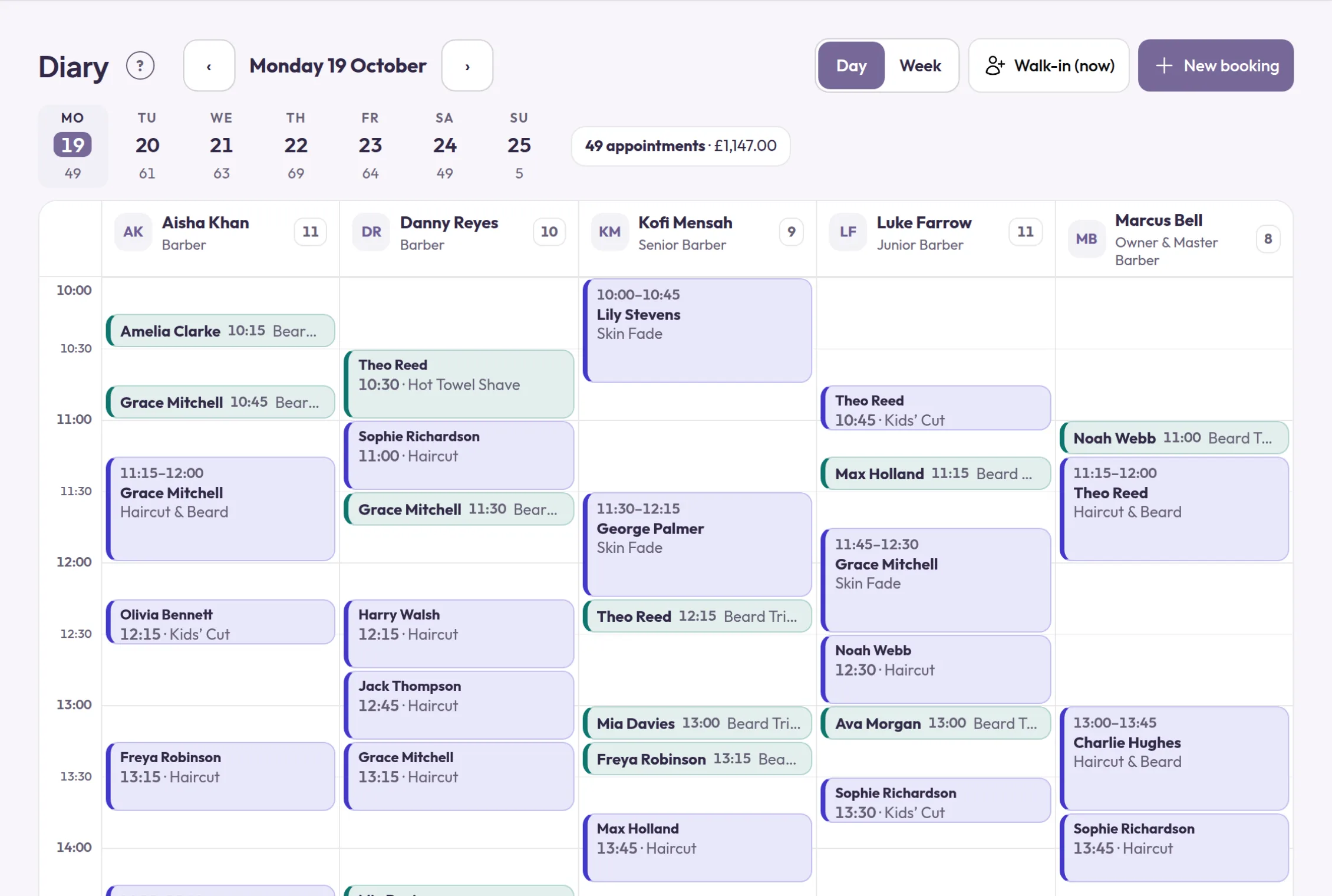
We load it into your account and check it by hand: the diary, the client book, the services, the prices, the team. Nothing is published, nobody is emailed, and not one reminder goes out while we work.
-
You approve
You read your own client list and click through your own booking page, while it is still visible to nobody but you. When you are satisfied it is right, you tell your clients, and not a moment before.
Then switch your booking link over
Most new customers find you on Google and tap Book. Change that link, and the few other places you have shared it, and they arrive on your new booking page.
Where to change it
- Your Google Business Profile: replace the booking link with yours. If the old Book button comes from a connected provider, remove that provider.
- Your Instagram, Facebook and TikTok bios, the Book now buttons on your website and your automatic message replies.
- New QR codes for your window and your flyers, each with its own tracking link, so you can see which one brings in bookings.
- Keep the old system open until the appointments already in it have taken place, or let us move them across.
Your booking page can be your website
For many customers, your booking page is the first page of yours they see, and often the only one. Give it your story, photos of your work and your certificates, a description, photos and a video for every service, and your reviews with your customers’ own photos. When it answers their questions, they book with confidence instead of going looking.
Read the step-by-step guideWhat comes across, and what cannot
Both lists, on the same page and in the same size. You are about to trust us with your client book; you should know now where the edges are.
What comes across
Everything your day actually runs on.
- Your client book: names, email addresses, phone numbers, and the notes you keep on people.
- Every appointment already in the diary, so you open with a full week rather than an empty one.
- Past visits, so a regular still reads as a regular, and their history is waiting the first time they sign in.
- Gift vouchers still outstanding, balance for balance. You sign the list off in writing before we load a penny of it.
- Your services, with their durations and their prices.
- Your team.
- Your logo and your photos (your room, your work, your team) on whichever of our five themes suits you best, Neutral among them for a brand that would rather lead. The page your clients open is recognisably yours.
What does not
Nobody can move these.
- Reviews and star ratings. They were collected on someone else’s platform, under their terms, and they stay there.
- Marketplace ranking and search placement. There is no marketplace here. Your page promotes you and nobody else, which is the point and also the trade.
- Saved card details. Card data never leaves the payment processor it was saved with, so your clients add a card again the first time you take a deposit, paid straight into your own Stripe account, never through us.
- Your clients’ app accounts. With us they continue with Google or Apple, or with their email address and a code we send, and their history is already there.
- Message threads and chat history.
- A pixel-for-pixel copy of your old page. You get your photos, your services, your prices and your team, recognisably yours on day one, not a tracing of somebody else’s design.
We will never ask for your password
Not once, and not to save you time. Your login is yours to protect and ours to stay out of. Handing it over would breach your agreement with them and put us inside an account that is not ours. Every export is clicked by you, in your own account, with us on the call if you would like a hand.
Your client book is legally yours
Most owners have never been told this, and it changes the conversation.
The personal data your current platform holds about your clients is data your business is the controller of. The platform is a processor: it holds that data on your instructions, and that is the basis on which it is allowed to hold it at all. Their own export buttons will give you most of what you need. For anything they will not, here is a letter you can send.
Copy it, replace what is in square brackets, and send it to their support or privacy team. It cites Article 28(3)(g) of the UK GDPR and the data processing terms you already agreed with them.
The letter
Scroll to read it in full. The button copies all of it.
In the EU? Add one sentence: “We also rely on the switching provisions of Regulation (EU) 2023/2854 (the Data Act), which have applied since 12 September 2025 and require you to assist us in switching and to make our data available in a structured, commonly used, machine-readable format.”
We wrote this template and we are not your lawyers. It is a starting point, not legal advice. It is deliberately not an Article 20 data-portability request: that right belongs to an individual person asking about their own data, not to a business asking about its client book, so citing it would put the wrong law on your letter.
And then the bill stops growing
A monthly price, 0% commission, and no fee for winning a new client. The comparison page does the arithmetic using each provider’s own published rates.
See the comparisonMoving from a particular system? Fresha, Booksy, Treatwell, Vagaro, Timely, Square Appointments
Open with a full diary
Sign up, send us your exports, and approve the result before anyone hears a word about it.
Get startedRather talk it through? Book a call back
Founding offer: your first 6 months for £5. After that, £50 a month per business and £40 for each extra location. Every feature, zero commission.